wget https://security.appspot.com/downloads/vsftpd-3.0.2.tar.gz
tar -zxvf vsftpd-3.0.2.tar.gz
yum -y install gcc openssl-devel libcap-devel tcp_wrappers-devel xinetd
cd vsftpd-3.0.2
sed -i 's/undef VSF_BUILD_TCPWRAPPERS/define VSF_BUILD_TCPWRAPPERS/g' builddefs.h
sed -i 's/undef VSF_BUILD_SSL/define VSF_BUILD_SSL/g' builddefs.h
make
ls -l vsftpd
mkdir /usr/share/empty/
mkdir /var/ftp/
mkdir /etc/vsftpd/
chown root.root /var/ftp
chmod og-w /var/ftp
make install
cp vsftpd.conf /etc/vsftpd
cp RedHat/vsftpd.pam /etc/pam.d/vsftpd
sed -i 's@file=/etc/ftpusers@file=/etc/vsftpd/ftpuser@g' /etc/pam.d/vsftpd

里歐 發表在 痞客邦 留言(0) 人氣()

class-map match-all mgmt
 match access-group name mgmt
class-map match-all level_1
 match access-group name level_1
class-map match-all level_2
 match access-group name level_2
class-map match-any VOICE
 match access-group name VOICE
 match ip dscp ef
!
!
policy-map 2M_COS_Queuing
 class level_1
  bandwidth 700
 class level_2
  bandwidth 400
 class VOICE
  priority 180
 class mgmt
  bandwidth 64
 class class-default
  fair-queue
policy-map shape-2M
 class class-default-2M
  shape average 2000000
 service-policy 2M_COS_Queuing

里歐 發表在 痞客邦 留言(0) 人氣()

#########################################################
## REG COMMAND 設定每3600秒同步NTP伺服器
REG ADD HKLM\SYSTEM\CurrentControlSet\Services\W32Time\TimeProviders\NtpClient /v SpecialPollInterval /d 0x00000e10 /t REG_DWORD /f
#########################################################

里歐 發表在 痞客邦 留言(1) 人氣()

wget https://github.com/downloads/libevent/libevent/libevent-2.0.20-stable.tar.gz
tar xzf libevent-2.0.20-stable.tar.gz
cd libevent-2.0.20-stable
./configure --prefix=/usr/local/libevent && make && sudo make install

里歐 發表在 痞客邦 留言(0) 人氣()

wget https://security.appspot.com/downloads/vsftpd-3.0.0.tar.gz
tar -zxvf vsftpd-3.0.0.tar.gz
yum -y install gcc openssl-devel
cd vsftpd-3.0.0
sed -i 's/undef VSF_BUILD_TCPWRAPPERS/define VSF_BUILD_TCPWRAPPERS/g' builddefs.h
sed -i 's/undef VSF_BUILD_SSL/define VSF_BUILD_SSL/g' builddefs.h
make
ls -l vsftpd
useradd nobody
mkdir /usr/share/empty/
mkdir /var/ftp/
mkdir /etc/vsftpd/
useradd -d /var/ftp ftp
chown root.root /var/ftp
chmod og-w /var/ftp
make install
cp vsftpd /usr/local/sbin/vsftpd
cp vsftpd.conf /etc/vsftpd
cp RedHat/vsftpd.pam /etc/pam.d/vsftpd
sed -i 's@file=/etc/ftpusers@file=/etc/vsftpd/ftpuser@g' /etc/pam.d/vsftpd

里歐 發表在 痞客邦 留言(0) 人氣()

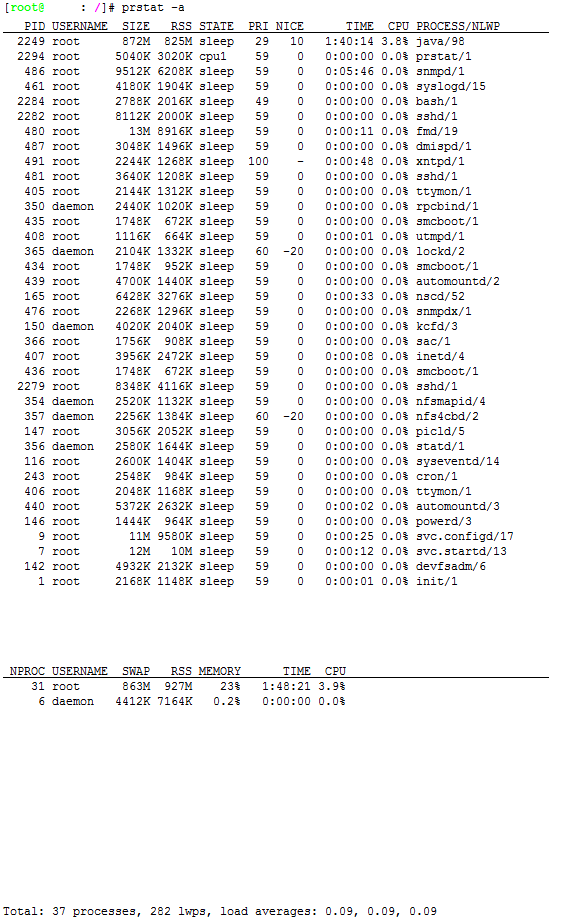
prstat -a


 Column Headings for the prstat Report


Default Column Heading
Description


PID 
The PID number of the process.


USERNAME        
The login name or UID of the owner of the process.


SIZE 
The total virtual memory size of the process.


RSS 
The resident set size of the process in kilobytes, megabytes, or gigabytes.


STATE 
The state of the process:


•   cpu – The process is running on the CPU.


•   sleep – The process is waiting for an event to complete.


•   run – The process is in the run queue.


•   zombie – The process terminated, and the parent is not waiting.


•   stop – The process is stopped.


PRI 
The priority of the process.


NICE 
The value used in priority computation.


TIME 
The cumulative execution time for the process.


CPU 
The percentage of recent CPU time used by the process.


PROCESS/NLWP    
The name of the process/the number of lightweight processes (LWPs) in the process.

里歐 發表在 痞客邦 留言(0) 人氣()

01
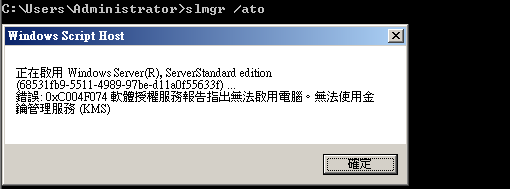
由於目前文件上提到的可能原因為KMS不是1.2版本才造成此問題,根據實際的經驗,以下三個原因都可能造成此錯誤的產生:
狀況1:KMS Server版本非升級至1.2版本
狀況2:KMS Client無法找到KMS Server
狀況3:KMS Client的時間或時區設定錯誤

里歐 發表在 痞客邦 留言(0) 人氣()


198.78.204.253
60.199.191.11
64.4.11.160
65.54.87.180
65.54.87.81


199.93.49.254
60.199.191.26
64.4.11.30
65.54.87.181
65.54.87.87


199.93.52.253
60.199.191.27
64.4.30.134
65.54.87.182
65.54.87.88


199.93.56.254
60.199.191.33
64.4.30.89
65.54.87.208
65.54.87.98


204.160.115.253
60.199.191.34
65.54.51.251
65.54.87.209
65.54.87.99


204.160.116.253
60.199.191.35
65.54.51.253
65.54.87.211
65.55.12.249


205.128.75.253
60.199.191.8
65.54.87.100
65.54.87.212
65.55.13.190


205.128.91.254
60.199.191.9
65.54.87.108
65.54.87.216
65.55.13.86


206.33.38.254
60.254.153.11
65.54.87.109
65.54.87.217
65.55.184.152


206.33.53.253
60.254.153.16
65.54.87.110
65.54.87.218
65.55.184.155


206.33.63.254
60.254.153.17
65.54.87.13
65.54.87.220
65.55.184.16


207.123.49.253
60.254.153.19
65.54.87.132
65.54.87.221
65.55.184.26


207.123.53.254
60.254.153.24
65.54.87.135
65.54.87.226
65.55.184.27


207.46.19.254
60.254.153.25
65.54.87.136
65.54.87.227
65.55.185.26


207.46.21.123
60.254.153.26
65.54.87.137
65.54.87.228
65.55.200.139


207.46.21.124
60.254.153.8
65.54.87.14
65.54.87.229
65.55.200.155


207.46.21.58
60.254.153.9
65.54.87.149
65.54.87.27
65.55.200.156


208.49.52.10
60.254.175.25
65.54.87.150
65.54.87.28
65.55.25.60


208.49.52.8
60.254.175.58
65.54.87.153
65.54.87.39
65.55.27.220


209.84.13.118
60.254.175.66
65.54.87.154
65.54.87.40
65.55.53.190


209.84.5.254
60.254.175.8
65.54.87.16
65.54.87.41
8.12.221.254


23.3.104.10
63.150.131.16
65.54.87.163
65.54.87.42
8.254.0.124


23.3.104.42
63.150.131.25
65.54.87.164
65.54.87.57
8.27.252.253


23.3.104.43
63.150.131.33
65.54.87.165
65.54.87.58
8.27.253.125


23.3.104.66
63.150.131.41
65.54.87.166
65.54.87.59
8.27.254.126


4.23.63.253
63.150.131.42
65.54.87.17
65.54.87.61
8.27.254.249


4.26.254.126
63.150.131.8
65.54.87.171
65.54.87.62
8.27.255.254


58.26.185.57
63.217.21.11
65.54.87.172
65.54.87.78


58.27.22.57
63.217.21.9
65.54.87.177
65.54.87.79


58.27.22.90
63.80.242.17
65.54.87.178
65.54.87.80
 

里歐 發表在 痞客邦 留言(0) 人氣()

cd /tmp
mkdir cactiupgrade
cd cactiupgrade
wget http://www.cacti.net/downloads/cacti-0.8.7i-PIA-3.1.tar.gz
tar -xvzf cacti-0.8.7i-PIA-3.1.tar.gz
cat /var/www/html/include/config.php | grep database_password
mysqldump -l -u cactiuser -p  --add-drop-table cacti > mysql.cacti
ls -al
mv /var/www/html /var/www/html_old
mv cacti-0.8.7i-PIA-3.1 /var/www/
mv /var/www/cacti-0.8.7i-PIA-3.1 /var/www/html
cat /var/www/html_old/include/config.php | grep database_type
cat /var/www/html/include/config.php | grep database_type
cat /var/www/html_old/include/config.php | grep database_default
cat /var/www/html/include/config.php | grep database_default
cat /var/www/html_old/include/config.php | grep database_hostname
cat /var/www/html/include/config.php | grep database_hostname
cat /var/www/html_old/include/config.php | grep database_username
cat /var/www/html/include/config.php | grep database_username
cat /var/www/html_old/include/config.php | grep database_password
cat /var/www/html/include/config.php | grep database_password
vi /var/www/html/include/config.php
cp --reply=yes /var/www/html_old/rra/* /var/www/html/rra/
cp -u /var/www/html_old/scripts/* /var/www/html/scripts/
cp -u -R /var/www/html_old/resource/* /var/www/html/resource/
mv /var/www/html_old/plugins/index.php /var/www/html_old/plugins/index.php.old
cp -u -R /var/www/html_old/plugins/* /var/www/html/plugins/
chown -R apache.apache /var/www/html

里歐 發表在 痞客邦 留言(0) 人氣()

Print Spooler  (Disable)
管理所有本機和網路列印佇列,並控制所有列印工作。如果這個服務被停止,本機電腦列印將無法使用。如果這個服務被停用,任何明確依存於它的服務將無法啟動。 

Remote Registry  (Disable)
啟用遠端使用者修改這個電腦上的登錄設定。如果這個服務被停止,登錄只能由這個電腦上的使用者修改。如果這個服務被停用,任何明確依存於它的服務將無法啟動。

里歐 發表在 痞客邦 留言(0) 人氣()


安裝 ntp 伺服器
yum install ntp tzdata
chkconfig ntpd on


# ntp: 就是 NTP 伺服器的主要軟體啦,包括設定檔以及執行檔等等。

# tzdata: 軟體名稱為『 Time Zone data 』的縮寫,提供各時區對應的顯示格式。


編輯 /etc/ntp.conf:

# 拒絕 IPv4
restrict default kod nomodify notrap nopeer noquery
  
# 拒絕 IPv6
restrict -6 default kod nomodify notrap nopeer noquery
  
# 放行指定的主機,一般會填寫上層 NTP Server
restrict your.time.server
# 放行 tock.stdtime.gov.tw 進入本 NTP 伺服器
restrict 220.130.158.71
# 放行 tick.stdtime.gov.tw 進入本 NTP 伺服器
 restrict 59.124.196.83
# 放行 time.stdtime.gov.tw 進入本 NTP 伺服器
 restrict 59.124.196.84
  
# 預設放行本機
restrict 127.0.0.1
restrict -6 ::1
  
# 放行指定的私有網路主機  
restrict 192.168.100.0 mask 255.255.255.0 nomodify
# ignore: 拒絕所有類型的 NTP 連線;
# nomodify: 用戶端不能使用 ntpc 與 ntpq 這兩支程式來修改伺服器的時間參數, 但用戶端仍可透過這部主機來進行網路校時的;
# noquery: 用戶端不能夠使用 ntpq, ntpc 等指令來查詢時間伺服器,等於不提供 NTP 的網路校時囉;
# notrap: 不提供 trap 這個遠端事件登錄 (remote event logging) 的功能。
# notrust: 拒絕沒有認證的用戶端。

  
# 設定上層 NTP Server 
# 原本的 [0|1|2].centos.pool.ntp.org 的可以註解掉
server your.time.server
server 220.130.158.71 prefer  <==以這部主機為最優先
server 59.124.196.83
server 59.124.196.84


# 預設時間差異分析檔案與暫不用到的 keys 等
driftfile /var/lib/ntp/drift
keys      /etc/ntp/keys
參考網址 http://linux.vbird.org/linux_server/0440ntp.php
參考網址 http://www.brennan.id.au/09-Network_Time_Protocol.html

里歐 發表在 痞客邦 留言(0) 人氣()

Memtest86+:  This runs from a boot disk or CD and should eliminate or confirm if your one or more of your memory sticks are bad or the SPD values in the BIOS are correct.
Let it run for as long as you can: 2,4,6,8 or more hours (at least 3 full passes), if no errors by then your ram is OK.
http://www.memtest.org/
Memtest86+ Guide/How To's (use the .ISO to create a bootable CD)
http://www.overclockers.com/forums/showthread.php?t=409152

里歐 發表在 痞客邦 留言(0) 人氣()

Blog Stats
⚠️

成人內容提醒

本部落格內容僅限年滿十八歲者瀏覽。
若您未滿十八歲,請立即離開。

已滿十八歲者,亦請勿將內容提供給未成年人士。