PIXNET Logo登入

里歐's 布拉格

跳到主文

生活543

部落格全站分類:不設分類

  • 相簿
  • 部落格
  • 留言
  • 名片
  • 2月 23 週四 201213:45
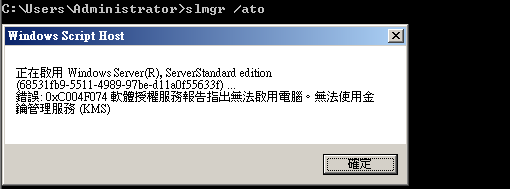
  • Windows 2008 R2找KMS Server做產品啟動時,出現0xC004F074錯誤

01
由於目前文件上提到的可能原因為KMS不是1.2版本才造成此問題,根據實際的經驗,以下三個原因都可能造成此錯誤的產生:
狀況1:KMS Server版本非升級至1.2版本
狀況2:KMS Client無法找到KMS Server
狀況3:KMS Client的時間或時區設定錯誤
(繼續閱讀...)
文章標籤

里歐 發表在 痞客邦 留言(0) 人氣(603)

  • 個人分類:Windows
▲top
  • 2月 17 週五 201213:40
  • Windows Update Server IP


198.78.204.253
60.199.191.11
64.4.11.160
65.54.87.180
65.54.87.81


199.93.49.254
60.199.191.26
64.4.11.30
65.54.87.181
65.54.87.87


199.93.52.253
60.199.191.27
64.4.30.134
65.54.87.182
65.54.87.88


199.93.56.254
60.199.191.33
64.4.30.89
65.54.87.208
65.54.87.98


204.160.115.253
60.199.191.34
65.54.51.251
65.54.87.209
65.54.87.99


204.160.116.253
60.199.191.35
65.54.51.253
65.54.87.211
65.55.12.249


205.128.75.253
60.199.191.8
65.54.87.100
65.54.87.212
65.55.13.190


205.128.91.254
60.199.191.9
65.54.87.108
65.54.87.216
65.55.13.86


206.33.38.254
60.254.153.11
65.54.87.109
65.54.87.217
65.55.184.152


206.33.53.253
60.254.153.16
65.54.87.110
65.54.87.218
65.55.184.155


206.33.63.254
60.254.153.17
65.54.87.13
65.54.87.220
65.55.184.16


207.123.49.253
60.254.153.19
65.54.87.132
65.54.87.221
65.55.184.26


207.123.53.254
60.254.153.24
65.54.87.135
65.54.87.226
65.55.184.27


207.46.19.254
60.254.153.25
65.54.87.136
65.54.87.227
65.55.185.26


207.46.21.123
60.254.153.26
65.54.87.137
65.54.87.228
65.55.200.139


207.46.21.124
60.254.153.8
65.54.87.14
65.54.87.229
65.55.200.155


207.46.21.58
60.254.153.9
65.54.87.149
65.54.87.27
65.55.200.156


208.49.52.10
60.254.175.25
65.54.87.150
65.54.87.28
65.55.25.60


208.49.52.8
60.254.175.58
65.54.87.153
65.54.87.39
65.55.27.220


209.84.13.118
60.254.175.66
65.54.87.154
65.54.87.40
65.55.53.190


209.84.5.254
60.254.175.8
65.54.87.16
65.54.87.41
8.12.221.254


23.3.104.10
63.150.131.16
65.54.87.163
65.54.87.42
8.254.0.124


23.3.104.42
63.150.131.25
65.54.87.164
65.54.87.57
8.27.252.253


23.3.104.43
63.150.131.33
65.54.87.165
65.54.87.58
8.27.253.125


23.3.104.66
63.150.131.41
65.54.87.166
65.54.87.59
8.27.254.126


4.23.63.253
63.150.131.42
65.54.87.17
65.54.87.61
8.27.254.249


4.26.254.126
63.150.131.8
65.54.87.171
65.54.87.62
8.27.255.254


58.26.185.57
63.217.21.11
65.54.87.172
65.54.87.78


58.27.22.57
63.217.21.9
65.54.87.177
65.54.87.79


58.27.22.90
63.80.242.17
65.54.87.178
65.54.87.80
 

(繼續閱讀...)
文章標籤

里歐 發表在 痞客邦 留言(0) 人氣(405)

  • 個人分類:Windows
▲top
  • 1月 06 週五 201219:18
  • Windows 2003 Server 關閉不必要的服務

Print Spooler  (Disable)
管理所有本機和網路列印佇列,並控制所有列印工作。如果這個服務被停止,本機電腦列印將無法使用。如果這個服務被停用,任何明確依存於它的服務將無法啟動。 

Remote Registry  (Disable)
啟用遠端使用者修改這個電腦上的登錄設定。如果這個服務被停止,登錄只能由這個電腦上的使用者修改。如果這個服務被停用,任何明確依存於它的服務將無法啟動。
(繼續閱讀...)
文章標籤

里歐 發表在 痞客邦 留言(0) 人氣(179)

  • 個人分類:Windows
▲top
  • 7月 01 週五 201115:18
  • Forgotten local Administrator password in Windows


Last modified: Aug. 1, 2008


Contents


1 - Summary


2 - Boot from CD


3 - Select hard drive


4 - Select registry path


5 - Password or registry edit


6 - Save changes


1 - Summary


This little guide will show how to reset the local Administrator password in


case you forgot it. This has been tested in Windows XP.


2 - Boot from CD


Offline NT Password & Registry Editor can be downloaded at the following


website. Download the image and create the CD.


http://home.eunet.no/pnordahl/ntpasswd/


Set your BIOS to boot from CD as the first boot option. Put the CD and boot


from it. This is the first screen you will see.


Press Enter to continue.


3 - Select hard drive


Select the hard drive where Windows is installed. In this example there is


only one hard drive containing one partition.


Press 1 and then Enter to continue.


4 - Select registry path


Select the path where the Windows registry is stored. In this example it is


WINDOWS\system32\config.


Press 1 and then Enter to continue.


5 - Password or registry edit


The Windows registry is being loaded into system memory.


Press 1 and then Enter to continue.


Type in the username of the local Administrator and press Enter to continue.


Press 1 to clear out the user password and then Enter to continue. The


password is now blank.


6 - Save changes


Press q to Quit and then Enter to continue. You will now be asked to save your


changes. Press y to save your changes and then Enter to continue. Press n to


quit and then Enter to continue.


Finally, remove the CD and then press CTRL-ALT-DEL to reboot.


(繼續閱讀...)
文章標籤

里歐 發表在 痞客邦 留言(0) 人氣(19)

  • 個人分類:Windows
▲top
  • 8月 09 週一 201011:30
  • 正常移轉 FSMO 五大角色

正常移轉 FSMO 五大角色

Acitvie Directory
中有所謂的五大「彈性單一主機操作 (FSMO)」角色,由 DC 負責:
架構主機:架構主機網域控制站會控制對架構所做的所有更新及修改。如果要更新樹系的架構,必須具有架構主機的存取權限。整個樹系中只能有一個架構主機。
  • 功能:只有 Schema Master 的 Schema 資料庫可以修改。

  • 整個 Forest 只有 1 台。

  • 預設值為:Root Domain 的第 1 台 DC。

  • 有權力操作的群組: Schema Admins 群組才有資格修改 Schema 的內容。

  • 操作的工具,必須先經過註冊。(如:Regsvr32 schmmgmt.dll )。

  • 需使用 mmc 掛入"Active Directory 架構"嵌入式管理單元。

  • Schema 中的資料會複製到 Forest 中的每 1 台 DC。

  • 網域命名主機:網域命名主機網域控制站會控制在樹系中新增或移除網域。整個樹系中只能有一個網域命名主機。
  • 功能:控制 Forest 中,新增移除網域的行為。

  • 整個 Forest 只有 1 台。

  • 預設值為:Root Domain 的第 1 台 DC。

  • 有權力操作的群組:Enterprise Admins。

  • 操作的工具:Active Directory 網域及信任。

  • 基礎結構主機:基礎結構負責更新自己網域中物件對其他網域中物件的參考。在任何時候,每個網域中只能有一個網域控制站做為基礎結構主機。
  • 功能:確保網域內建操作的物件一致性。

  • 避免與 GC 同一台。

  • 每一個 Domain 都有 1 台。

  • 預設值為:每一個 Domain 的第 1 台 DC。

  • 有權力操作的群組:Domain Admins。

  • 操作的工具:Active Directory 使用者及電腦。

  • 相對 ID (RID) 主機:RID 主機負責處理來自特
    定網域中所有網域控制站的 RID 集區要求。在任何時候,每個網域中只能有一個網域控制站做為 RID 主機。
  • 功能:分配 RID 的號碼給所有 DC,避免物件(object)的 SID 重複。

  • 每一個 Domain 都有 1 台。

  • 預設值為:每一個 Domain 的第 1 台 DC。

  • 有權力操作的群組:Domain Admins。

  • 操作的工具:Active Directory 使用者及電腦。

  • PDC操作主機:PDC 操作主機是一個網域控制站,它會對執行舊版 Windows 的工作站、成員伺服器和網域控制站通告自己是主要網域控制站(PDC)。例如,如果網域中包含不是執行 Microsoft Windows XP Professional (商用版) 或 Microsoft Windows 2000 用戶端軟體的電腦,或者如果其中包含 Microsoft Windows NT 備份網域控制站,PDC 操作主機就會成為 Windows NT PDC。它也是網域主機瀏覽器 (Domain Master Browser),而且會處理密碼不符的問題。在任何時候,樹系的每個網域中只能有一個網域控制站做為 PDC 操作主機。
  • 功能:


    • 模擬 Windows 2000 前版(NT4.0)的 PDC 角色。

    • 網域中時間同步化的主要伺服器。

    • 預設為修改群組原則(GPO)的主要伺服器。

  • 每一個 Domain 都有 1 台。

  • 預設值為:每一個 Domain 的第 1 台 DC。

  • 有權力操作的群組:Domain Admins。

  • 操作的工具:Active Directory 使用者及電腦。

  • 當公司新進一台設備打算取代原舊有 DC 時,就必須「確定」正常移轉 FSMO 五大角色才行..
    步驟一: 針對 RID、PDC 與基礎架構主機
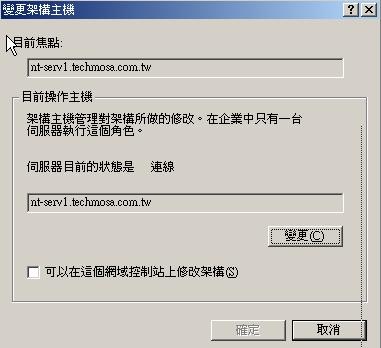
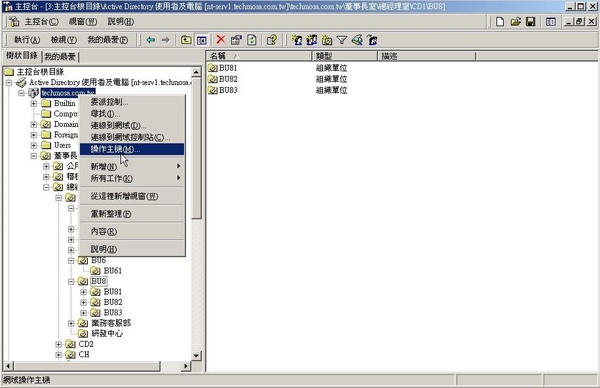
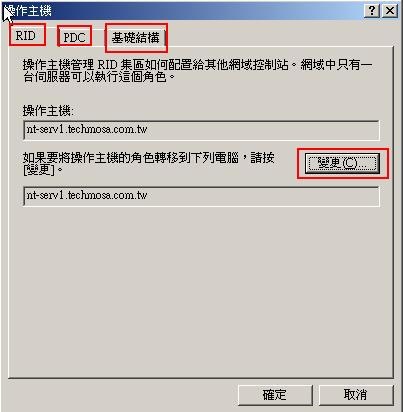
    在要轉移角色的新網域控制站上,在網域的圖示上按右鍵,然後按「操作主機」,在「變更操作主機」對話方塊,按您要傳送角色的標籤,按下「變更」按鈕,再按「確定」按鈕。

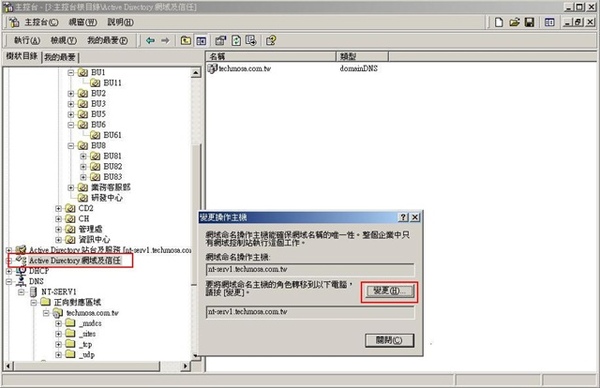
    步驟二: 針對 網域命名主機
    在要轉移角色的新網域控制站上,在「Active Dierctory 網域與信任」的圖示上按右鍵,然後按「操作主機」,其他步驟與上一步驟同。

    步驟三: 針對 架構主機
    在要轉移角色的新網域控制站上,在「Active Dierctory 架構」的圖示上按右鍵,然後按「操作主機」,其他步驟與上一步驟同。不過,預設並沒有「Active Dierctory 架構」選項,需要自行變更!
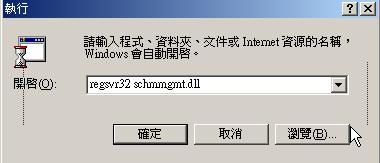
  • 由「開始」→「執行」→輸入 regsvr32 schmmgmt.dll,然後按「確定」。


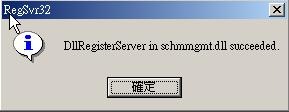
  • 成功的話會有下列訊息

    2. 在「主控台」功能表,按「增加/移除嵌入式管理單元」
    按一下「新增」,選擇「Active Directory 架構」,按一下「新增」。

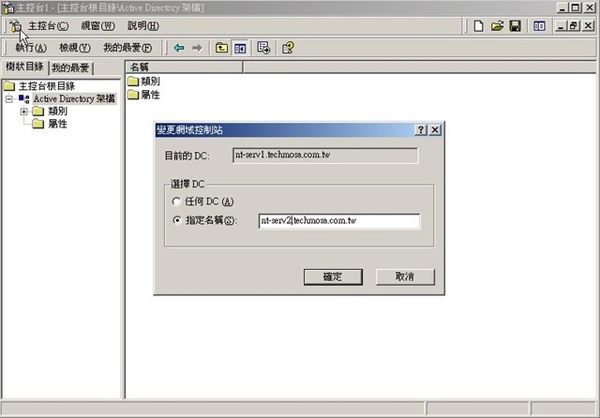
    3. 在主控台樹狀目錄中,以滑鼠右鍵按一下「Active Directory 架構」,再按一下「變更網域控制站」。
    按一下「指定名稱」,輸入即將要轉移角色的新網域控制站名稱,再按一下「確定」。

    在主控台樹狀目錄中,以滑鼠右鍵按一下「Active Directory 架構」,再按一下「操作主機」。
    按一下「變更」、「確定」,確認您要轉移角色,再按一下「關閉」。

    最後還有一個角色需要移轉
     通用類別目錄(Global Catalog,以下稱 GC)
    ·  功能:
    • 尋找物件。通用類別目錄讓使用者可尋找樹系中所有網域的目錄資訊,而不論資料存放何處。您可在最快速度及最低網路流量條件下,進行樹系內尋找。
    •
    支援使用者主要名稱 (UPN) 驗證。當驗證網域控制站缺少帳戶資料時,通用類別目錄就會解析使用者主要名稱。舉例來說,如果使用者帳戶位於「example1.microsoft.com」,使用者決定以使用者主要名稱「
    user1@example1.microsoft.com」,從「example2.microsoft.com」的電腦登入,則「example2.microsoft.com」的網域控制站就會找不到使用者帳戶,接著,就會聯絡通用類別目錄伺服器完成登入程序。

    •
    支援多重網域環境的萬用群組成員資格資訊。不像儲存在每個網域的通用群組 (Global Group) 成員資格,萬用群組 (Universal Group) 成員資格只存在通用類別目錄。舉例來說,當萬用群組的使用者,登入到Windows 2000網域或更高版本的網域時,通用類別目錄就會提供萬用群組成員資料給使用者帳戶。

    當使用者登入到Windows 2000網域或更高版本的網域,卻無法使用通用類別目錄時,如果使用者曾經登入過,電腦利用電腦中的快取憑證幫助使用者登入。如果使用者並未登入過該網域,則使用者就僅能登入本機。

    ·  預設值為:每一個 Domain 的第 1 台 DC。
    ·  有權力操作的群組:Domain Admins。
    ·  操作的工具:Active Directory 站台及服務。
     
    步驟四: 針對 通用類別目錄
    1. 在「Active Dierctory 站台和服務」的圖示上,
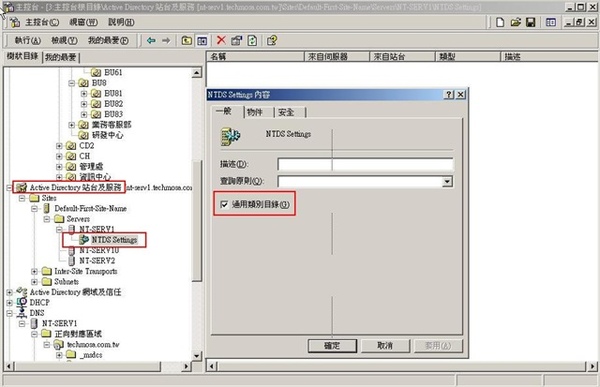
    點選「Sites → Default-First-Site-Name → Servers」,選擇要轉移角色的新網域控制站(也可直接從那台設定),然後選擇右方欄位中的「NTDS Settings」按滑鼠右鍵選擇「內容」。
    2.  將「通用類別目錄」勾選,啟動。

    3.  完成之前五大角色及GC的移轉後把原先DC關機,觀察個一、二個禮拜看看是否無誤
    4.  最後確認沒問題後,利用 dcpromo 將原先 DC降級為成員伺服器
    5.  移除網域架構站台
    原有的物件點選「Sites → Default-First-Site-Name → Servers」,選擇舊有DC,然後按滑鼠右鍵選擇「刪除」。
    **如果說你的狀況是屬於原Win 2000 AD 要更換為新設備且升級為 Win 2003 AD
    則在移轉五大角色前需先把 Win 2003 加入到原2000 AD下成為成員伺服器,並在 Windows Server 2003 光碟片的 i386 的目錄下
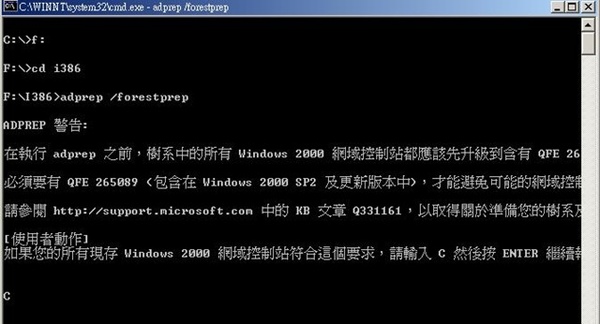
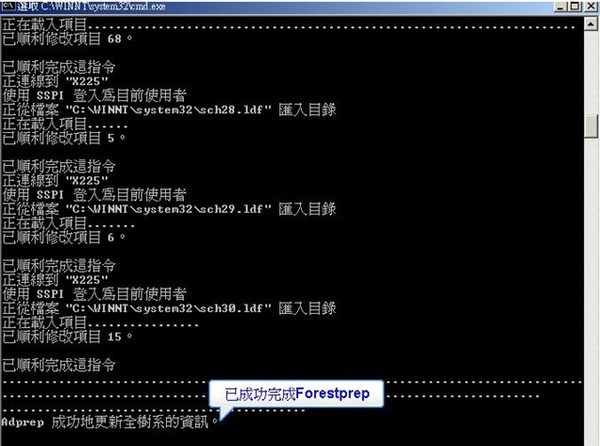
    執行:adprep /forestprep (此為執行樹系升級作業)

     
    這是為了使 Windows 2000 Server DC 的網域樹系提升到能與 Windows Server 2003 DC 相容
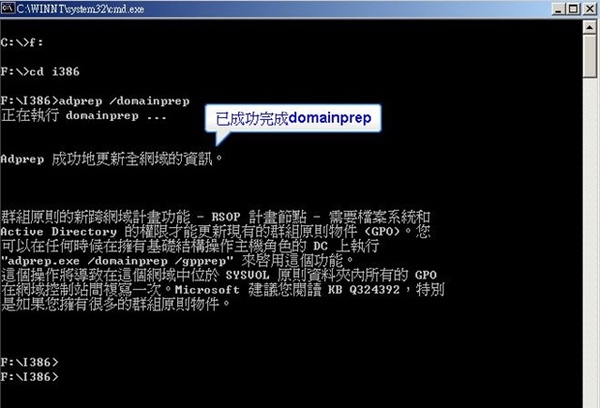
             adprep /domainprep (此為執行網域升級作業)

    這是為了使 Windows 2000 Server DC 的網域提升到能與 Windows Server 2003 DC 相容
    參考資料:
    http://www.wretch.cc/blog/josephphoto/3644722
    http://forums.microsoft.com/Technet-CHT/ShowPost.aspx?PostID=4025533&SiteID=23
    http://support.microsoft.com/kb/324801
    http://forum.icst.org.tw/phpbb/viewtopic.php?f=15&t=8495&st=0&sk=t&sd=a&start=135

     
    (繼續閱讀...)
    文章標籤

    里歐 發表在 痞客邦 留言(0) 人氣(284)

    • 個人分類:Windows
    ▲top
    • 12月 22 週二 200915:45
    • 如何在升級既有Windows2K3SP1 ActiveDirectory Server 至 Windows2K3SP1 R2 ActiveDirectory Server


    How do I install Windows Server 2003 R2 on an existing Windows 2003 Service Pack 1 (SP1) ActiveDirectory server?


    A. If you're installing Windows 2003 R2 on an existing Windows 2003 server with SP1 installed, you require only the second R2 CD-ROM. Insert the second CD and the r2auto.exe will display the Windows 2003 R2 Continue Setup screen.

    If you're installing R2 on a domain controller (DC), you must first upgrade the schema to the R2 version (this is a minor change and mostly related to the new Dfs replication engine). To update the schema, run the Adprep utility, which you'll find in the Cmpnents\r2\adprep folder on the second CD-ROM. Before running this command, ensure all DCs are running Windows 2003 or Windows 2000 with SP2 (or later). Here's a sample execution of the Adprep /forestprep command: D:\CMPNENTS\R2\ADPREP>adprep /forestprep ADPREP WARNING:
     
    Before running adprep, all Windows 2000 domain controllers in the forest should be upgraded to Windows 2000 Service Pack 1 (SP1) with QFE 265089, or to Windows 2000 SP2 (or later).
     QFE 265089 (included in Windows 2000 SP2 and later) is required to prevent poten
    tial domain controller corruption.
     For more information about preparing your forest and domain see KB article Q331161 at http://support.microsoft.com.
     [User Action]
    If ALL your existing Windows 2000 domain controllers meet this requirement, type
    C and then press ENTER to continue. Otherwise, type any other key and press ENT
    ER to quit.
    C
    Opened Connection to SAVDALDC01
    SSPI Bind succeeded
    Current Schema Version is 30
    Upgrading schema to version 31
    Connecting to "SAVDALDC01"
    Logging in as current user using SSPI
    Importing directory from file "C:\WINDOWS\system32\sch31.ldf"
    Loading entries.....................................................
    ......................................................

    139 entries modified successfully.

    The command has completed successfully
    Adprep successfully updated the forest-wide information.
    After running Adprep, install R2 by performing these steps:
    1.        Click the "Continue Windows Server 2003 R2 Setup" link, as the figureshows.
    2.        At the "Welcome to the Windows Server 2003 R2 Setup Wizard" screen, click Next.
    3.        You'll be prompted to enter an R2 CD key (this is different from your existing Windows 2003 keys) if the underlying OS wasn't installed from R2 media (e.g., a regular Windows 2003 SP1 installation). Enter the R2 key and click Next. Note: The license key entered for R2 must match the underlying OS type, which means if you installed Windows 2003 using a volume-license version key, then you can't use a retail or Microsoft Developer Network (MSDN) R2 key.
    4.        You'll see the setup summary screen which confirms the actions to be performed (e.g., Copy files). Click Next. After the installation is complete, you'll see a confirmation dialog box. Click Finish.
    (繼續閱讀...)
    文章標籤

    里歐 發表在 痞客邦 留言(0) 人氣(37)

    • 個人分類:Windows
    ▲top
    1

    自訂側欄

    自訂側欄

    個人資訊

    里歐
    暱稱:
    里歐
    分類:
    不設分類
    好友:
    累積中
    地區:

    熱門文章

    • (10,647)[Linux][CentOS]設定 yum mirror 為台灣地區
    • (2,556)[Cacti] Cacti 錯誤訊息及排除方法
    • (2,547)[Linux] 調整時區、系統時間、BIOS時間、同步系統時間 For Redhat
    • (1,344)Solaris 環境變數設定
    • (1,098)如何將AD由win server 2003 升級至win server 2008
    • (990)[Linux] Configuring the Softflowd NetFlow Exporter
    • (603)Windows 2008 R2找KMS Server做產品啟動時,出現0xC004F074錯誤
    • (560)Exchange 2010 標準版及企業版差異功能
    • (289)Enterasys A2 Switch Restore Configuration to factory defaults (Reset Password)
    • (284)正常移轉 FSMO 五大角色

    文章分類

    • Mikrotik (0)
    • 理財 (0)
    • Cacti (1)
    • XenServer (1)
    • VMware (1)
    • 旅遊 & 飲食 (1)
    • Network (1)
    • Cisco (12)
    • Windows (6)
    • MySQL (7)
    • Solaris (18)
    • Symantec (6)
    • 文章 (3)
    • Acronis (0)
    • FortiGate (3)
    • Linux (48)
    • Microsoft (5)
    • 未分類文章 (1)

    最新文章

    • Installation vsftpd-3.0.2 with xinetd on CentOS 6 .4 x86_64
    • MPLS QoS Example
    • 手動設定windows ntp client (w32tm & reg)
    • Installation Memcached On CentOS 6.3
    • Installation vsFTPd on CentOS
    • Solaris Command
    • Windows 2008 R2找KMS Server做產品啟動時,出現0xC004F074錯誤
    • Windows Update Server IP
    • CactiEZ 0.6 upgrade to Cacti 0.8.7i
    • Windows 2003 Server 關閉不必要的服務

    最新留言

    • [19/04/17] Srini 於文章「手動設定windows ntp clie...」留言:
      There are few examples here fo...
    • [12/07/17] 羅嚴克拉姆 於文章「使用 PsExec 執行遠端電腦 cmd...」發表了一則私密留言

    動態訂閱

    文章精選

    文章搜尋

    誰來我家

    參觀人氣

    • 本日人氣:
    • 累積人氣: