PIXNET Logo登入

里歐's 布拉格

跳到主文

生活543

部落格全站分類:

  • 相簿
  • 部落格
  • 留言
  • 名片
  • 3月 25 週一 201319:29
  • Installation vsftpd-3.0.2 with xinetd on CentOS 6 .4 x86_64

wget https://security.appspot.com/downloads/vsftpd-3.0.2.tar.gz
tar -zxvf vsftpd-3.0.2.tar.gz
yum -y install gcc openssl-devel libcap-devel tcp_wrappers-devel xinetd
cd vsftpd-3.0.2
sed -i 's/undef VSF_BUILD_TCPWRAPPERS/define VSF_BUILD_TCPWRAPPERS/g' builddefs.h
sed -i 's/undef VSF_BUILD_SSL/define VSF_BUILD_SSL/g' builddefs.h
make
ls -l vsftpd
mkdir /usr/share/empty/
mkdir /var/ftp/
mkdir /etc/vsftpd/
chown root.root /var/ftp
chmod og-w /var/ftp
make install
cp vsftpd.conf /etc/vsftpd
cp RedHat/vsftpd.pam /etc/pam.d/vsftpd
sed -i 's@file=/etc/ftpusers@file=/etc/vsftpd/ftpuser@g' /etc/pam.d/vsftpd
(繼續閱讀...)
文章標籤

里歐 發表在 痞客邦 留言(0) 人氣(175)

  • 個人分類:Linux
▲top
  • 9月 12 週三 201221:15
  • Installation Memcached On CentOS 6.3

wget https://github.com/downloads/libevent/libevent/libevent-2.0.20-stable.tar.gz
tar xzf libevent-2.0.20-stable.tar.gz
cd libevent-2.0.20-stable
./configure --prefix=/usr/local/libevent && make && sudo make install
(繼續閱讀...)
文章標籤

里歐 發表在 痞客邦 留言(0) 人氣(16)

  • 個人分類:Linux
▲top
  • 7月 20 週五 201220:43
  • Installation vsFTPd on CentOS

wget https://security.appspot.com/downloads/vsftpd-3.0.0.tar.gz
tar -zxvf vsftpd-3.0.0.tar.gz
yum -y install gcc openssl-devel
cd vsftpd-3.0.0
sed -i 's/undef VSF_BUILD_TCPWRAPPERS/define VSF_BUILD_TCPWRAPPERS/g' builddefs.h
sed -i 's/undef VSF_BUILD_SSL/define VSF_BUILD_SSL/g' builddefs.h
make
ls -l vsftpd
useradd nobody
mkdir /usr/share/empty/
mkdir /var/ftp/
mkdir /etc/vsftpd/
useradd -d /var/ftp ftp
chown root.root /var/ftp
chmod og-w /var/ftp
make install
cp vsftpd /usr/local/sbin/vsftpd
cp vsftpd.conf /etc/vsftpd
cp RedHat/vsftpd.pam /etc/pam.d/vsftpd
sed -i 's@file=/etc/ftpusers@file=/etc/vsftpd/ftpuser@g' /etc/pam.d/vsftpd
(繼續閱讀...)
文章標籤

里歐 發表在 痞客邦 留言(0) 人氣(25)

  • 個人分類:Linux
▲top
  • 11月 17 週四 201121:28
  • 安裝及設定ntp伺服器


安裝 ntp 伺服器
yum install ntp tzdata
chkconfig ntpd on


# ntp: 就是 NTP 伺服器的主要軟體啦,包括設定檔以及執行檔等等。

# tzdata: 軟體名稱為『 Time Zone data 』的縮寫,提供各時區對應的顯示格式。


編輯 /etc/ntp.conf:

# 拒絕 IPv4
restrict default kod nomodify notrap nopeer noquery
  
# 拒絕 IPv6
restrict -6 default kod nomodify notrap nopeer noquery
  
# 放行指定的主機,一般會填寫上層 NTP Server
restrict your.time.server
# 放行 tock.stdtime.gov.tw 進入本 NTP 伺服器
restrict 220.130.158.71
# 放行 tick.stdtime.gov.tw 進入本 NTP 伺服器
 restrict 59.124.196.83
# 放行 time.stdtime.gov.tw 進入本 NTP 伺服器
 restrict 59.124.196.84
  
# 預設放行本機
restrict 127.0.0.1
restrict -6 ::1
  
# 放行指定的私有網路主機  
restrict 192.168.100.0 mask 255.255.255.0 nomodify
# ignore: 拒絕所有類型的 NTP 連線;
# nomodify: 用戶端不能使用 ntpc 與 ntpq 這兩支程式來修改伺服器的時間參數, 但用戶端仍可透過這部主機來進行網路校時的;
# noquery: 用戶端不能夠使用 ntpq, ntpc 等指令來查詢時間伺服器,等於不提供 NTP 的網路校時囉;
# notrap: 不提供 trap 這個遠端事件登錄 (remote event logging) 的功能。
# notrust: 拒絕沒有認證的用戶端。

  
# 設定上層 NTP Server 
# 原本的 [0|1|2].centos.pool.ntp.org 的可以註解掉
server your.time.server
server 220.130.158.71 prefer  <==以這部主機為最優先
server 59.124.196.83
server 59.124.196.84


# 預設時間差異分析檔案與暫不用到的 keys 等
driftfile /var/lib/ntp/drift
keys      /etc/ntp/keys
參考網址 http://linux.vbird.org/linux_server/0440ntp.php
參考網址 http://www.brennan.id.au/09-Network_Time_Protocol.html
(繼續閱讀...)
文章標籤

里歐 發表在 痞客邦 留言(0) 人氣(562)

  • 個人分類:Linux
▲top
  • 10月 31 週一 201111:58
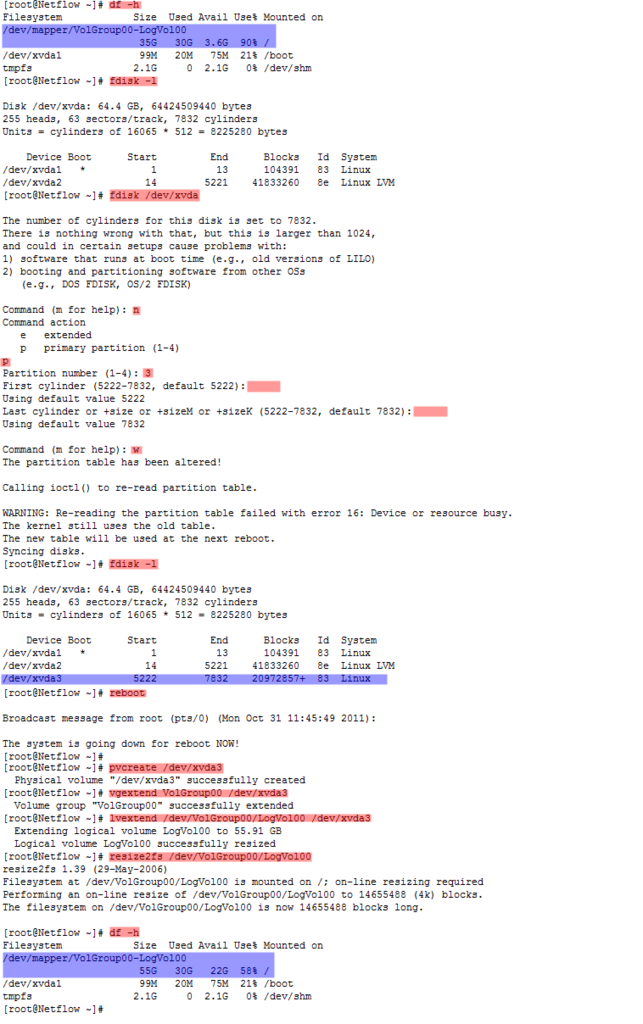
  • 擴增LVM磁碟空間 (Increasing Disk Space in CentOS using LVM)

Increasing Disk Space in CentOS using LVM  
(繼續閱讀...)
文章標籤

里歐 發表在 痞客邦 留言(0) 人氣(65)

  • 個人分類:Linux
▲top
  • 7月 01 週五 201115:22
  • Forgotten root password in Red Hat Enterprise Linux


Contents
1 - Summary
2 - Console set to secure
3 - Console set to insecure
1 - Summary
This guide will show how to reset the root password in case you forgot it.
This has been tested in Red Hat Enterprise Linux 4 and 5.
2 - Console set to secure
This method works where the console is set to secure in the /etc/inittab file
without the following line: ~~:S:wait:/sbin/sulogin. When booting into
single-user mode it doesn't prompt for the root password. If you use default
boot loader GRUB, press any key to enter the GRUB menu. Using the arrow keys
select the version of the kernel that you want to edit and press [e] to enter
into edit mode. Go to the end of the line and press space once then add the
word single to tell GRUB to boot into single-user mode. In Red Hat Enterprise
Linux 4 press [b] to boot while in Red Hat Enterprise Linux press [Enter] to
boot.
grub append> ro root=LABEL=/ rhgb quiet single
Reset the password for the root user.
sh-3.2# passwd root
Changing password for user root.
New UNIX password: ********
Retype new UNIX password: ********
passwd: all authentication tokens updated successfully.
Reboot the system and log in with the root account using the new password.
sh-3.2# shutdown -r now
3 - Console set to insecure
This method works where the console is set to insecure in the /etc/inittab file
with the following line: ~~:S:wait:/sbin/sulogin. When booting into single-user
mode it does prompt for the root password. Boot from the installation CD. In
Red Hat Enterprise Linux 4 you will need to type "linux rescue selinux=0" while
in Red Hat Enterprise Linux 5 type the following at the installation boot
prompt.
boot: linux rescue
Select a language at the Language menu and hit [Enter]. Select a keyboard at
the Keyboard Type menu and hit [Enter]. Select No at the Setup Networking
screen. Select Continue at the Rescue menu and hit [Enter]. The rescue
environment will try to find the Linux installation and mount it under the
directory /mnt/sysimage. The next screen lets you know if it was successful or
failed. Hit [Enter] to continue.
Get a list of the disks.
sh-3.2# fdisk -l | grep Disk
Disk /dev/hda: 80.0 GB, 80026361856 bytes
Get information about the hard disk.
sh-3.2# dmesg | grep hda:
<6> ide0: BM-DMA at 0xf000-0xf007, BIOS settings: hda:DMA, hdb:DMA
<4>hda: WDC WD800BB-75CAA0, ATA DISK drive
<6>hda: max request size: 128KiB
<6>hda: Host Protected Area detected.
<6>hda: Host Protected Area disabled.
<6>hda: 156301488 sectors (80026 MB) w/2048KiB Cache, CHS=65535/16/63, UDMA(100)
<6>hda: cache flushes not supported
<6> hda: hda1 hda2 hda3
View information about the file systems.
sh-3.2# cat /mnt/sysimage/etc/fstab
LABEL=/ / ext3 defaults 1 1
LABEL=/data /data ext3 defaults 1 2
tmpfs /dev/shm tmpfs defaults 0 0
devpts /dev/pts devpts gid=5,mode=620 0 0
sysfs /sys sysfs defaults 0 0
proc /proc proc defaults 0 0
LABEL=SWAP-hda3 swap swap defaults 0 0
Change the root directory to point to /mnt/sysimage and run the passwd command
for the root user.
sh-3.2# chroot /mnt/sysimage /usr/bin/passwd root
Changing password for root user.
New UNIX password: ********
Retype new UNIX password: ********
passwd: all authentication tokens updated successfully.
Reboot the system and login with the root account using the new password. Make
sure to remove the installation CD.
sh-3.2# exit


(繼續閱讀...)
文章標籤

里歐 發表在 痞客邦 留言(0) 人氣(45)

  • 個人分類:Linux
▲top
  • 6月 17 週五 201111:44
  • LinuxCBT Postfix 筆記

*************************************************
******Download Postfix
*************************************************
mkdir postfix
cd postfix
wget ftp://ftp4.tnc.edu.tw/pub1/Postfix/official/postfix-2.7.0.tar.gz
wget ftp://ftp4.tnc.edu.tw/pub1/Postfix/official/postfix-2.7.0.tar.gz.sig
wget ftp://ftp4.tnc.edu.tw/pub1/Postfix/wietse.pgp
(繼續閱讀...)
文章標籤

里歐 發表在 痞客邦 留言(0) 人氣(334)

  • 個人分類:Linux
▲top
  • 5月 30 週一 201110:47
  • Linux指令

尋找當下目錄裡*.jpg且大於1024k並執行ls -lh查看, 將最後結果導入ls_jpg.txt中.
find ./ -name "*.jpg" -size +1024k  -exec ls -lh {} \; > /root/ls_jpg.txt
(繼續閱讀...)
文章標籤

里歐 發表在 痞客邦 留言(0) 人氣(10)

  • 個人分類:Linux
▲top
  • 5月 20 週五 201117:47
  • 安裝及設定 vsftp on centos (以本機帳戶登入)

安裝及設定 vsftp on centos

安裝vsftp

  1. yum install vsftpd


設定iptables的ftp模組 [ vi /etc/sysconfig/iptables-config ]

  1. 修改參數 

    1. IPTABLES_MODULES="ip_conntrack_netbios_ns"
      修改成如下
      IPTABLES_MODULES="ip_conntrack_netbios_ns ip_conntrack_ftp"


設定iptables規則 [ vi /etc/sysconfig/iptables ]

  1.  新增參數

    1. -A RH-Firewall-1-INPUT -m state --state NEW -m tcp -p tcp --dport 21 -j ACCEPT


設定selinux

  1. setsebool -P ftp_home_dir=1


新增本機帳戶使用者

  1. useradd leo


設定本機帳戶密碼

  1. passwd leo


(繼續閱讀...)
文章標籤

里歐 發表在 痞客邦 留言(0) 人氣(307)

  • 個人分類:Linux
▲top
  • 9月 14 週二 201017:33
  • Compiling Cacti Spine for Redhat/Fedora Linux

Prerequisites
net-snmp-devel

mysql

mysql-devel

openssl-devel

(繼續閱讀...)
文章標籤

里歐 發表在 痞客邦 留言(0) 人氣(149)

  • 個人分類:Linux
▲top
12...5»

自訂側欄

自訂側欄

個人資訊

里歐
暱稱:
里歐
分類:
好友:
累積中
地區:

熱門文章

  • (283)正常移轉 FSMO 五大角色
  • (285)Enterasys A2 Switch Restore Configuration to factory defaults (Reset Password)
  • (10,640)[Linux][CentOS]設定 yum mirror 為台灣地區
  • (989)[Linux] Configuring the Softflowd NetFlow Exporter
  • (2,547)[Linux] 調整時區、系統時間、BIOS時間、同步系統時間 For Redhat
  • (1,344)Solaris 環境變數設定
  • (602)Windows 2008 R2找KMS Server做產品啟動時,出現0xC004F074錯誤
  • (4,822)手動設定windows ntp client (w32tm & reg)

文章分類

  • Mikrotik (0)
  • 理財 (0)
  • Cacti (1)
  • XenServer (1)
  • VMware (1)
  • 旅遊 & 飲食 (1)
  • Network (1)
  • Cisco (12)
  • Windows (6)
  • MySQL (7)
  • Solaris (18)
  • Symantec (6)
  • 文章 (3)
  • Acronis (0)
  • FortiGate (3)
  • Linux (48)
  • Microsoft (5)
  • 未分類文章 (1)

最新文章

  • Installation vsftpd-3.0.2 with xinetd on CentOS 6 .4 x86_64
  • MPLS QoS Example
  • 手動設定windows ntp client (w32tm & reg)
  • Installation Memcached On CentOS 6.3
  • Installation vsFTPd on CentOS
  • Solaris Command
  • Windows 2008 R2找KMS Server做產品啟動時,出現0xC004F074錯誤
  • Windows Update Server IP
  • CactiEZ 0.6 upgrade to Cacti 0.8.7i
  • Windows 2003 Server 關閉不必要的服務

動態訂閱

文章精選

文章搜尋

誰來我家

參觀人氣

  • 本日人氣:
  • 累積人氣: